
How to Structure a Next.js Application
I'm currently working on a ground-up rewrite of Jovian using TypeScript, React, Next.js, Tailwind, Drizzle ORM, Shadcn UI, and Effect. Since most of the code is being written by LLMs, it's essential to structure the project for easy navigation, search, and refactoring.
Here's the folder structure I'm using:
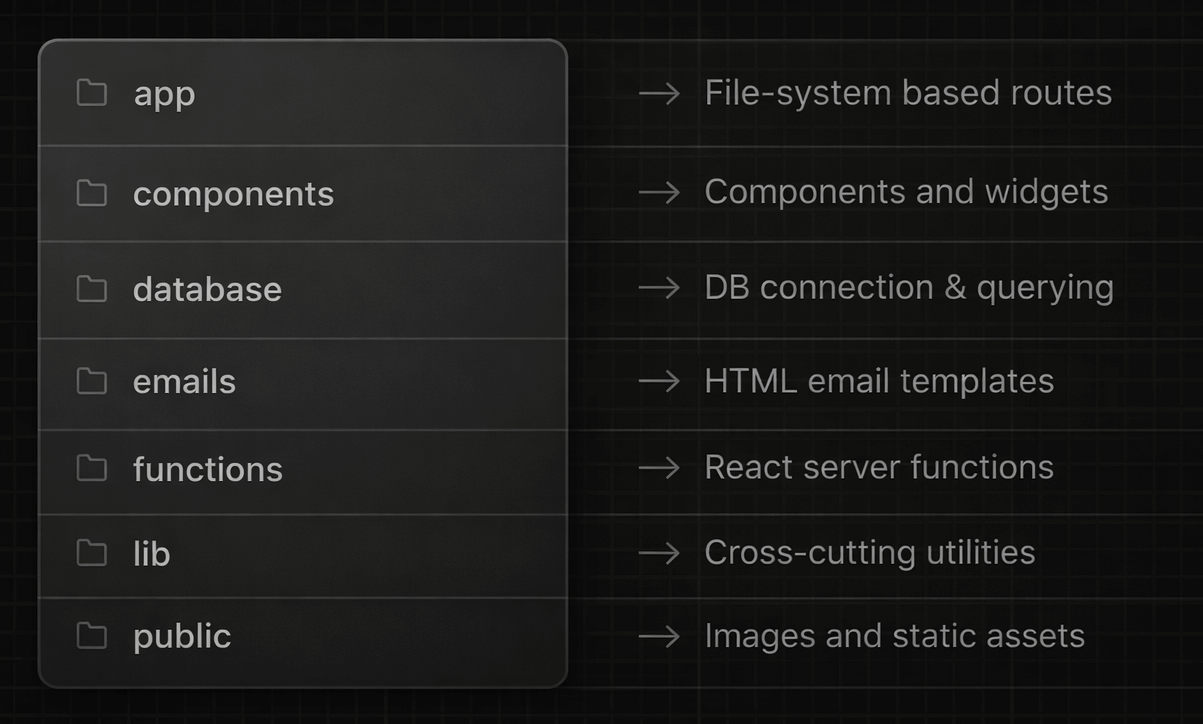
1. app - File-System Based Routes
The app folder contains the file-system based routing structure used by Next.js. Each folder has a page.tsx file with a React server component (e.g. SocialPostPage)[1]. It may also contain other files like layout.tsx for shared layouts and loading.tsx for loading states.
Here's an example page.tsx file:
import LikeButton from "./components/like-button";
import { Navbar } from "@/components/navbar";
import { readPost } from "@/database/read";

export default async function SocialPostPage({
  params,
}: {
  params: Promise<{ id: string }>,
}) {
  const { id } = await params;
  const post = await readPost(id);

  return (
    <div>
      <Navbar username={post.authorName} />
      <main>
        <h1>{post.title}</h1>
        {/* ... */}
        <LikeButton likes={post.likes} />
      </main>
    </div>
  );
}
If the above code is placed in the file app/posts/[id]/page.tsx, it will handle all requests matching the route /posts/[id]. The SocialPostPage component is always rendered on the server (never on the client) and may contain backend logic (e.g. database queries)[2].
Pages often require dynamic UI widgets or forms, which must be defined in separate files as client components and are rendered in the browser[3]. These components can be placed in a components folder next to the corresponding page.tsx file (e.g. see LikeButton above).
2. components - Common Components & Widgets
The top-level components folder contains custom React components that are imported and used in multiple pages. These are typically client components with interactive elements like buttons, forms, dialogs, etc. The subfolder components/ui contains Shadcn UI primitives.
Here's an example client component, placed in the file components/navbar.tsx:
"use client"; // indiciates this file contains client components

import { useRouter } from "next/navigation";
import { Button } from "@/components/ui/button";

export function Navbar({ username }: { username: string }) {
  const router = useRouter();
  const handleLogout = () => router.push("/logout");
  return (
    <nav>
      <span>Welcome, {username}</span>
      <Button onClick={handleLogout}>Logout</Button>
    </nav>
  );
}
Navbar must be a client component because it uses the useRouter hook for navigation. React hooks (useState, useEffect, etc.), browser APIs (window, localStorage, etc.), and event handlers (onClick, onSubmit, etc.) can only be used in client components.
Custom components should always be built using primitives from components/ui (buttons, inputs, dropdowns, dialogs, etc.), not using raw HTML elements or CSS rules. This ensures a consistent design system across the application. E.g. Navbar uses the Button primitive.
3. database - DB Connection and Querying
The database folder encapsulates all database-related logic. Within database, the file schema.ts manages the database connection and defines Drizzle ORM tables[4]. The files create.ts, read.ts, update.ts, and delete.ts export functions for CRUD operations.
Here's an example schema file database/schema.ts:
import { drizzle } from "drizzle-orm/node-postgres";
import { pgTable, text, integer, timestamp } from "drizzle-orm/pg-core";

export const db = drizzle(process.env.DATABASE_URL!);

export const posts = pgTable("posts", {
  id: text("id").primaryKey(),
  title: text("title").notNull(),
  content: text("content").notNull(),
  likes: integer("likes").default(0),
  authorId: text("author_id").notNull(),
  createdAt: timestamp("created_at").defaultNow(),
});

// other database tables..
Here's an example query function in database/read.ts:
import { db, posts, users } from "./schema";
import { eq } from "drizzle-orm";

export async function readPost(id: string) {
  const result = await db
    .select({
      id: posts.id,
      title: posts.title,
      content: posts.content,
      likes: posts.likes,
      authorName: users.name,
    })
    .from(posts)
    .leftJoin(users, eq(posts.authorId, users.id))
    .where(eq(posts.id, id))
    .limit(1);

  return result[0];
}

// other read queries..
readPost can be imported and used directly in server components (like SocialPostPage above). Similarly, we can define createdPost, updatePost, etc. in other files to mutate data from server functions. Database queries must never be called from client components.
4. emails - HTML Email Templates
The emails folder contains email templates built using React Email and styled using Tailwind CSS. These are React components that render to HTML emails. Each template is a separate file exporting a component (e.g. PostPublishedEmail, ResetPasswordEmail).
Here's an example email template in emails/post-published-email.tsx:
import { Html, Body, ... } from "@react-email/components";

export function PostPublishedEmail({ title, url }: { title: string; url: string }) {
  return (
    <Html>
      <Tailwind>
        <Body className="bg-gray-50 font-sans">
          <Container className="p-6 bg-white rounded">
            <Heading className="text-2xl mb-4">Your post has been published!</Heading>
            <Text className="mb-2">Congratulations! Your post "{title}" is now live.</Text>
            <Button
              href={url}
              className="bg-blue-600 text-white px-4 py-2 rounded"
            >
              View Post
            </Button>
          </Container>
        </Body>
      </Tailwind>
    </Html>
  );
}
Email templates are rendered to HTML strings using React Email's render function, then sent via your email service provider (e.g. Amazon SES, SendGrid, Resend). This typically happens within React server functions after database operations like creating a post.
5. functions - React Server Functions
The functions folder contains React server functions that handle form submissions and data mutations. These are marked with the "use server" directive. Each function typically validates input, performs database operations, and handles side effects like sending emails.
Here's an example server function in functions/submit-create-post-form.ts:
"use server";

import { createPost } from "@/database/create";
import { redirect } from "next/navigation";
import { render } from "@react-email/components";
import { PostPublishedEmail } from "@/emails/post-published-email";
import { authenticate, sendEmail } from "@/lib/utils";

export async function submitCreatePostForm(
  prevState: { error?: string },
  formData: FormData
) {
  // Authenticate user
  const { user } = await authenticate();
  if (!user) return { error: "You must be logged in to create a post" };

  // Validate input
  const title = formData.get("title") as string;
  const content = formData.get("content") as string;
  if (!title || !content) return { error: "All fields are required" };

  // Write to database
  const post = await createPost({ title, content, authorId: user.id });

  // Send notification email
  const emailHtml = await render(
    PostPublishedEmail({ title: post.title, url: `https://example.com/posts/${post.id}` })
  );
  await sendEmail({ to: post.authorEmail, subject: "Post Published", html: emailHtml });

  // Redirect to the new post
  redirect(`/posts/${post.id}`);
}
The function can be used a the client component e.g. components/create-post-form.tsx:
"use client";

import { useActionState } from "react";
import { submitCreatePostForm } from "@/functions/submit-create-post-form";
import { Button } from "@/components/ui/button";
import { Input } from "@/components/ui/input";
import { Textarea } from "@/components/ui/textarea";

export function CreatePostForm() {
  const [state, formAction, isPending] = useActionState(
    submitCreatePostForm,
    {}
  );

  return (
    <form action={formAction} className="space-y-4">
      {state.error && <p className="text-red-500">{state.error}</p>}
      <Input name="title" placeholder="Post title" required />
      <Textarea name="content" placeholder="Write your post..." required />
      <Button type="submit" disabled={isPending}>
        {isPending ? "Publishing..." : "Publish Post"}
      </Button>
    </form>
  );
}
The useActionState hook connects client components to server functions. It returns state, formAction, and isPending. The server function receives previous state (initial value from useActionState) and form data. It returns a success/error state or redirects.
6. lib - Cross-Cutting Utilities
The lib folder contains shared code used across the application: types, constants, route definitions, and utility functions. Here are the key files within lib:
types.ts- All TypeScript types (e.g.User,Post,Session, etc.) used across multiple files. Centralizing types here avoids circular imports and simplifies navigation.routes.ts- Functions to construct route URLs (e.g.postRoute(id)instead of`/posts/${id}`) to avoid broken links and make refactoring/changing routes easier.server-utils.ts- Server-only utility functions likeauthenticate()(checks session cookies and returns the current user) andrequireAuth()(redirects to login if not authenticated). These use server-only APIs likecookies()fromnext/headers.server-constants.ts- Sensitive server-only constants, configurations, and environment variables that are used in server components and server functions.server-errors.ts- Custom error classes (e.g.AuthenticationError,NotAllowedError) for consistent error handling in server functions and API routes.utils.ts- Client-safe utility functions likecn()for Tailwind class merging, date formatting helpers, logging functions, and string utilities. It can be imported anywhere.constants.ts- Client-safe constants (APP_NAME,LOGO_PATH), environment variables (Turnstile, Google Analytics, etc.), and configurations. It can be imported anywhere.
Files prefixed with server- should only be imported in server components and functions. Use the server-only import to prevent these from being imported in client components.
7. public - Images and Static Assets
The public folder contains static assets that are served directly by Next.js at the root URL path. Files here are not processed or bundled. Here's the typical structure of the folder:
favicon.ico- Site icon displayed in browser tabsrobots.txt- Instructions for search engine crawlersimages/- Logos, screenshots, illustrations (e.g./images/logo.png)css/- External stylesheets not processed by Tailwindjs/- Third-party libraries loaded separately from the main bundle
Summary
Here's a quick reference for each top-level folder within the project:
app- File-system routes with server-rendered pagescomponents- Shared React client components and UI primitivesdatabase- Schema definitions and CRUD query functionsemails- React Email templates for transactional emailsfunctions- Server functions for form submissions and mutationslib- Types, constants, routes, and utility functionspublic- Static assets served at the root URL
This simple, flat, and largely obvious project structure ensures that both humans and LLMs can quickly understand the codebase, locate relevant files, and add new features or make targeted changes without getting lost in abstraction layers and deeply nested folder trees[5].
Footnotes
Instead of a
page.tsxfile, there can be aroute.tsfile for API routes for handing GET, POST, PUT, DELETE requests. API routes return JSON, text, or binary data instead of rendered React components. API routes are typically placed in theapp/apifolder.It's also worth noting that server components can’t use browser APIs (e.g.
window,localStorage), client-side hooks (e.g.useState,useEffect), event handlers (e.g.onClick,onSubmit), JavaScript-based interactivity, or DOM-dependent libraries.To be perfectly precise, client components are first server-rendered to HTML (without executing hooks), then sent to the browser and hydrated, where hooks and lifecycle methods execute. However, this is conceptually equivalent to rendering in the browser.
Encapsulating database logic in a separate folder makes it easier to switch between different database types (e.g. Postgres, SQLite), providers, and ORMs. It also improves code organization and reduces coupling between business logic and data access.
As the application grows beyond 40-50 routes and multiple teams start working on the same codebase, you can organize related routes into route groups and replicate the same structure (
components,database,functions,lib) inside each route group.